 ViewDAO
ViewDAO Studio Brand Voice vs. your custom system prompt - why "write like me" doesn't work
someone asked "why would I use this when I already have a system prompt that matches my voice?"
Because it probably doesn't. Not the way you think it does.
First - the custom system prompt approach is not dumb. If you're a creator on X using AI for content, you've almost certainly spent time refining a system prompt that says something like "write in a casual, direct tone, use short sentences, avoid corporate language." That instinct to control voice is the right one. Creators should sound like themselves, not like a brand account.
But there's a gap between describing your voice in words and showing the model your voice through examples. Even with a detailed system prompt, the output tends to read like a polished average of every account that gave similar instructions. The model follows the rules fine. It just doesn't pick up the rhythm that makes your writing yours.
Two factors drove our decision to build a structured voice system from scratch:
#1 - descriptions of voice don't capture voice
Tell Claude or ChatGPT "write casually, use short sentences, be direct." You'll get output that is casual, short-sentenced, and direct. It will also sound like every other account that gave the same instruction.
"Casual" means different things for different people. One creator's casual is fragments and mid-sentence pivots. Another's is long compound sentences with slang mixed in. A third writes in all lowercase with no punctuation. The word "casual" collapses all of those into the model's statistical average of casual internet writing.
Telling a model "write casually" produces different output than showing it two examples of how you actually write casually. The examples are the calibration. When the model reads your actual posts, it picks up on things you'd never think to put in a prompt: how you transition between ideas, whether you front-load the claim or build to it, how long your sentences actually are (not how long you think they are), which filler words you lean on and which you avoid completely.
Two creators can both score 3/10 on formality and produce completely different writing. The examples are what disambiguate them.
#2 - system prompts don't update themselves
Writing style drifts. How you wrote six months ago is not how you write now.
ViewDAO Studio's voice profiles are designed to be re-run. Feed it your last 5-10 posts from the past month, and the profile updates to match who you are now. The recommendation is every few months.
A system prompt can technically be rewritten too. But doing that means sitting down, figuring out how your writing has actually changed, putting that change into words, and testing whether the new instructions produce better output. That's the kind of thing that stays on the to-do list. ViewDAO Studio's voice extraction does it for you by reading your recent posts directly.
Now the detailed differences between system prompts and ViewDAO Studio Brand Voice:
Difference at the core: description vs. extraction
A system prompt describes your voice in natural language instructions. You tell the model what you sound like. ViewDAO Studio's Brand Voice extracts your voice from your actual posts. The model reads what you sound like.
Both constrain the model's output. They differ on whether the voice signal comes from your self-description or from your writing itself.
What the extraction actually produces
Feed ViewDAO Studio 5-10 of your real posts. The voice analyzer runs them through Claude Sonnet and extracts a structured profile.
It starts with a voice descriptor, two sentences summarizing how you actually write. Not a self-assessment. What the model finds when it reads your posts cold.
Then three tone scores, each 1-10: formality (how polished vs. raw the language is), bullishness (how conviction-heavy vs. cautious the takes are), and technical depth (how deep into the stack you go vs. keeping it accessible).
Sentence style gets categorized as short punchy, long compound, mixed, or fragment-heavy. This matters more than most creators realize. AI defaults to medium-length declarative sentences at a consistent rhythm, so if you write in fragments and sudden long compound sentences, the model needs to know that explicitly or it will flatten your style.
The profile also captures signature phrases (the specific language you reach for, like "ship it" instead of "deploy to production"), avoid phrases (words you never use, separate from ViewDAO Studio's global anti-slop list), and structural patterns (whether you open with the counterintuitive claim and work backward to evidence, or build from data to implication).
A system prompt might capture one or two of these things if you're very deliberate about writing it. The extraction captures all of them from your posts.
How injection works
A custom system prompt is static text you wrote about yourself, sitting at the top of a conversation.
ViewDAO Studio's voice block gets injected into every generation prompt automatically, and it's always the first thing the model reads, before format instructions, before the topic. Voice calibration happens before the model decides how to structure the content. We did this on purpose.
The injected block looks like this:
```
BRAND VOICE: [Your Name]
Formality: 3/10 | Bullishness: 8/10 | Technical depth: 7/10
Signature phrases to weave in naturally: [your phrases]
NEVER use these phrases: [your avoid list]
Writing style examples:
- "[Your actual post]"
- "[Your actual post]"
Match this voice precisely. If example posts are provided, mirror their
sentence rhythm, length, and personality — not just the topic.
```
The example posts are the most important part. Tone scores and descriptors give the model a frame. The actual posts show it what that frame looks like in practice. The voice analyzer performs best with posts you're proud of, not a random sample. The model learns to replicate what you do at your best.
Where voice gets applied
Every content generation mode loads the voice block. Article generation writes the full post body in your voice with your sentence rhythm from the start. Thread generation mirrors your cadence across every tweet in the thread. Reply drafts give you two options, both in your voice, both run through your avoid list before slop scoring. The summarize mode takes an article URL and returns a draft in your voice, not a neutral summary. And autopilot breaking news loads your voice profile before generating anything, which is what separates a bot account from content that could pass the "would this person actually say this?" test at 3am when you're asleep.
The slop scorer then runs on the output with your avoid_phrases wired in as additional banned vocabulary on top of ViewDAO Studio's global anti-slop list. If the output uses a phrase on your personal avoid list, it shows up as a voice mismatch flag, not a generic slop signal.
Voice presets
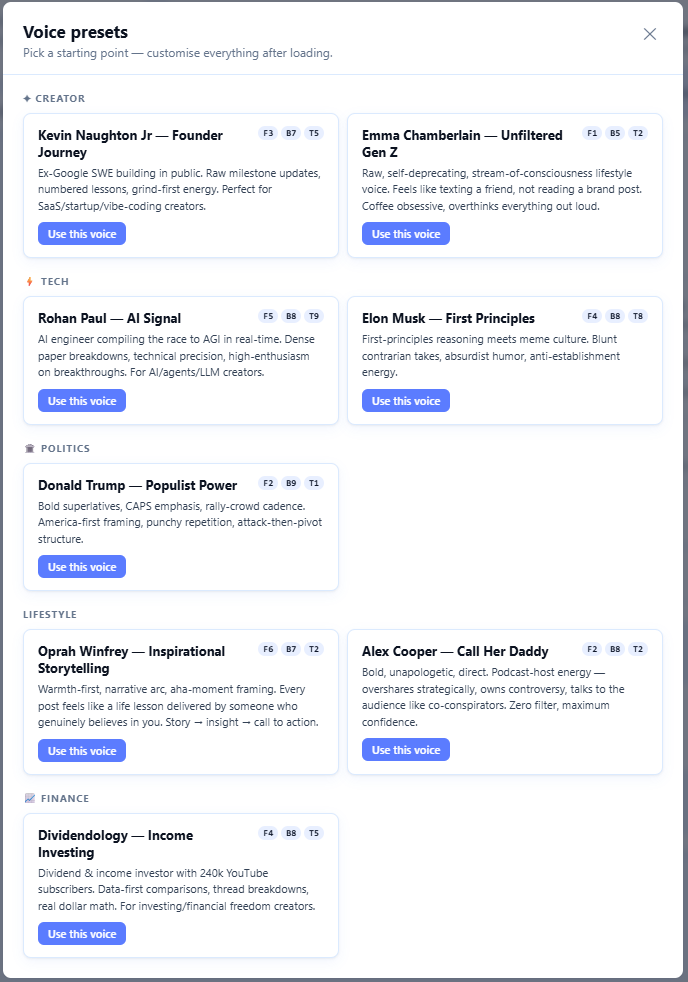
Not every creator wants to build a voice from scratch. ViewDAO Studio ships with a preset library, pre-built voice profiles for common creator archetypes in crypto and AI. Presets load through the same injection pipeline as personal voices. Useful for new accounts, for testing different tones on the same topic, or for operators managing multiple creators who need a starting point.
Multiple voices per account
ViewDAO Studio supports multiple saved voices per user, with one marked active at any time. A "Strategist" voice for macro takes and longer posts. A "Builder" voice for product and stack content. Same topic, completely different outputs depending on which is active.
You can test whether a more technical voice or a more accessible voice drives better engagement by switching the active voice and running the same topic through both. Or store separate voices for X vs. LinkedIn, because the sentence style that works on X reads as terse on LinkedIn.
Integration with slop scoring
System prompts can't do this part.
The slop scorer runs on every post after the voice-injected generation. Your personal avoid_phrases get wired in as additional banned vocabulary on top of the global anti-slop list. If the output uses a word you'd never say, it shows up as a specific voice mismatch flag. The scorer knows the difference between "this is a generic AI tell" and "this is a word this specific creator would never use."
With a system prompt, if the model ignores your "never say leverage" instruction, you catch it yourself or you don't. There's no automated gate between the generation and your feed.
The limitation worth knowing
Voice cloning works best when the input posts are consistent. Feed it posts from three different phases of your account, say early educational content, a degen phase, and current builder mode, and the model averages across all of them. The output ends up sounding like none of them.
The fix: curate the example posts. Pick 5-10 from the last 30-60 days that represent how you want to sound now. The model treats all examples as equally representative, so recency has to come from your curation, not chronology.
Custom system prompts (their home turf)
If you're using AI for one-off tasks across different tools, asking ChatGPT for a draft, then moving to Claude for editing, then back to ChatGPT for a thread, a portable system prompt you paste into each tool is the practical choice. It works everywhere. No lock-in. No extraction step. You can iterate on it mid-conversation.
For creators who generate content a few times a week and review every word before posting, the system prompt approach is fine. The voice gap matters less when you're manually editing every draft anyway.
ViewDAO Studio's Brand Voice is built for creators who run autopilot, who need voice-matched drafts generated and scored and posted while they sleep. If you're reviewing every draft manually, a system prompt works. If something is posting on your behalf at 3am, you need a system that doesn't depend on you being in the loop.
Recap:
the single difference between a custom system prompt and ViewDAO Studio Brand Voice is whether you describe your voice or the system extracts it from your actual writing.
but this decision leads to many differences down the line.
for our needs:
#1 - extraction captures patterns you'd never think to describe. Sentence rhythm, structural habits, signature phrases, and avoid lists all get pulled from your actual posts.
#2 - the voice profile connects to slop scoring and autopilot gating. A system prompt is isolated text with no connection to anything else in the pipeline.
Brand Voice over custom system prompts:
- Extraction from real posts captures voice patterns that descriptions miss. "Write casually" means something different for every creator. Your actual posts disambiguate it.
- Structured profiles with tone scores, signature phrases, avoid lists, and examples. Not a paragraph of instructions the model may or may not follow.
- Personal avoid lists wired into slop scoring. If the model ignores your voice, the scorer catches it before the post goes live.
- Re-runnable. Your voice drifts. The profile should drift with it. System prompts don't.
Try it at https://viewft.com/. Brand Voice is available on all ViewDAO Studio plans.