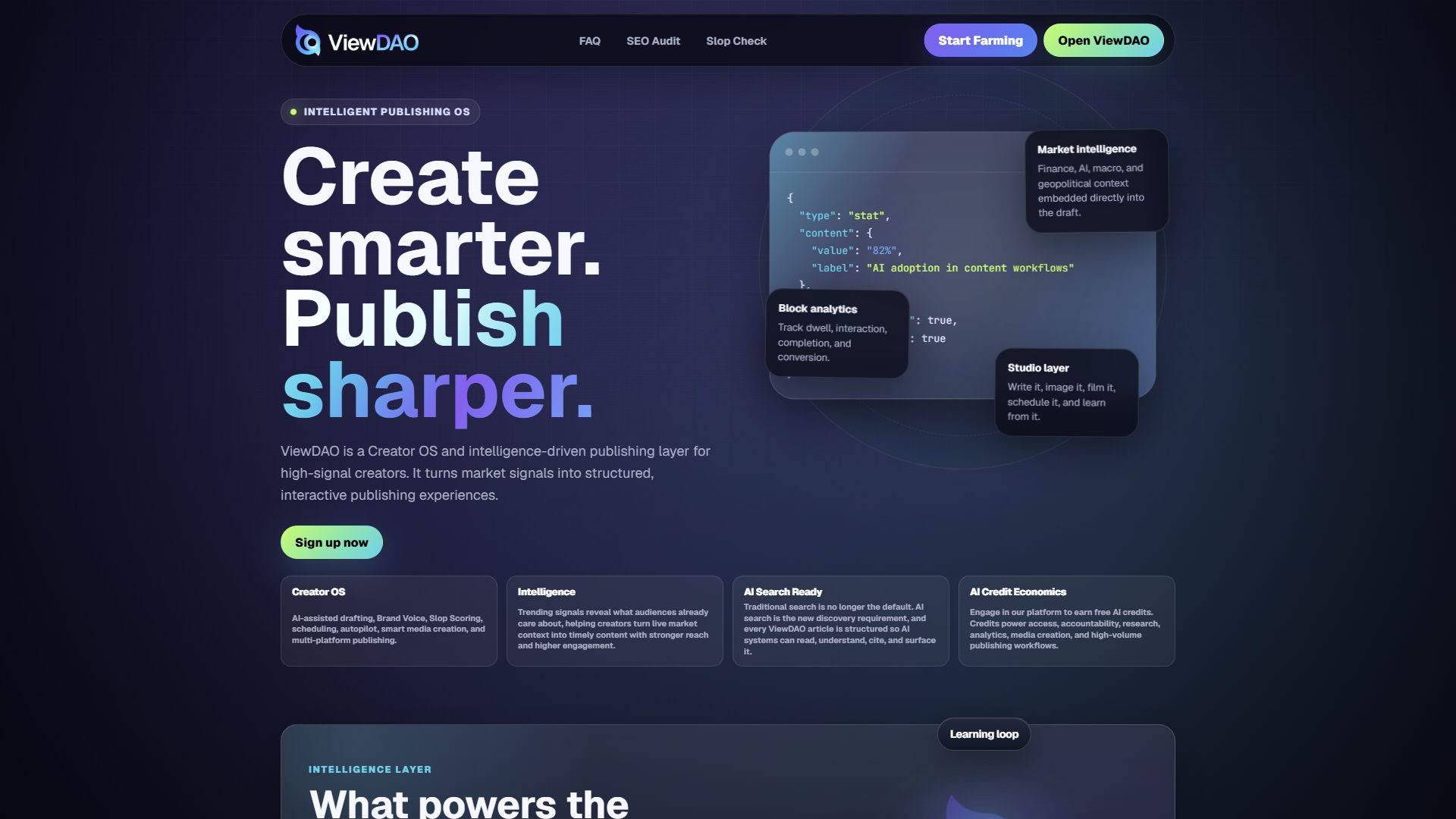
Create smarter. Publish sharper.
ViewDAO is the Intelligent Publishing OS for finance, technology, AI, macro, geopolitics, and crypto creators. AI writing, image, and video creation with market intelligence, prediction accountability, and token-powered platform credits built in. One studio. Every format.
The intelligence operating system for high-signal creators and teams.
ViewDAO helps creators, analysts, research teams, and media operators turn complex information into structured, interactive publishing experiences.
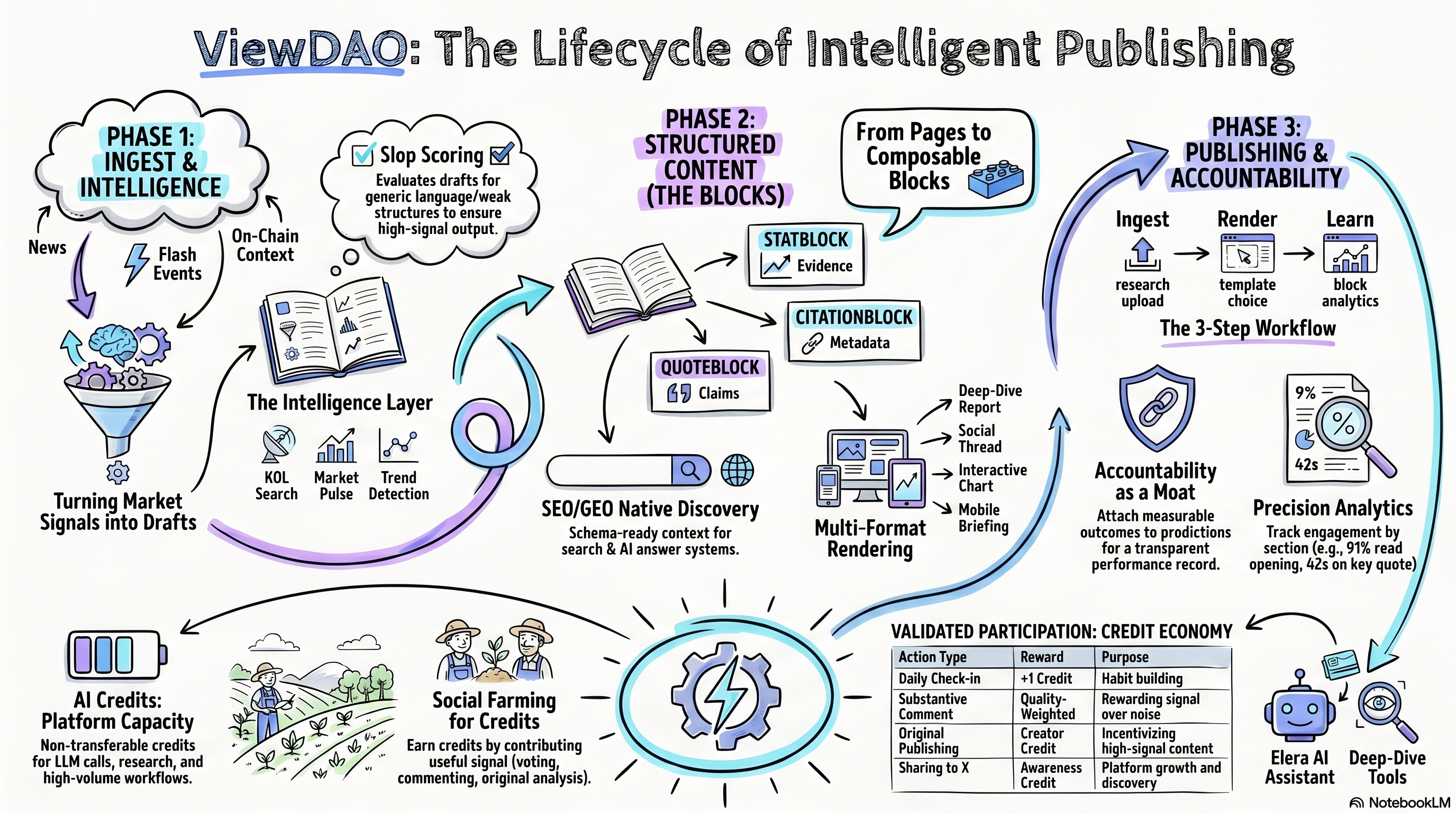
The project began with real-time news ingestion, creator workflows, market-aware drafting, scheduling, analytics, and community publishing infrastructure. The current platform combines that broader intelligence layer with reputation-weighted feeds, accountability tooling, and AI Credits access mechanics.
Market intelligence flows into every draft. AI helps creators write it, image it, and film it in one studio. A quality layer keeps every draft on-voice and sharp before it ships.
Instead of treating articles, reports, transcripts, charts, and market commentary as static pages, ViewDAO decomposes source material into reusable content blocks. Those blocks can become interactive explainers, market briefs, reports, sponsor pages, mobile stories, community experiences, and AI-assisted publishing campaigns.
The information environment has outgrown traditional publishing tools.
Finance, technology, AI, macro, and geopolitics are no longer separate beats. A single chip export restriction can move AI stocks, cloud capex, supply chains, and national security narratives. A central bank decision can change startup financing, consumer credit, bank risk, and public market multiples.
Creators and analysts are expected to explain this connective tissue in real time. Their tools are scattered across newsletters, AI assistants, social schedulers, analytics dashboards, spreadsheets, terminals, and research databases.
The audience ViewDAO is built to capture
What is missing today
- Unified signal-to-publish workflow: market pulse, trend detection, drafting, media generation, scheduling, analytics, and quality control should live in one loop.
- Block-level content structure: pages are too blunt. Claims, stats, quotes, sources, charts, risk notes, and calls to action should be distinct, reusable objects.
- Durable learning loop: important calls disappear into feeds. Creators need to know which sections held attention, which sources readers opened, and what signals should be watched next.
From publishing pages to rendering intelligence experiences.
ViewDAO is not only a news feed and not only a creator studio. It is infrastructure for transforming raw source material into structured content objects, rendering those objects into useful experiences, and measuring how each part performs.
- Create smarter: intelligence, context, market signals, and AI assistance flow into the creation process.
- Publish sharper: quality scoring, voice enforcement, scheduling, and format-aware rendering improve what goes live.
- One studio. Every format: text, images, video, reports, briefings, posts, and interactive experiences are outputs from the same intelligence system.
From pages to blocks
ViewDAO treats content as composable blocks: hero blocks, stat blocks, claim blocks, quote blocks, chart blocks, source blocks, timeline blocks, risk blocks, policy blocks, market context blocks, media blocks, CTA blocks, and sponsor placement blocks.
From attention to learning
The platform connects publishing performance to action through block-level analytics, source engagement, section dwell time, conversion events, format testing, and audience response signals.
Four layers turn raw source material into structured publishing output.
| Layer | Role | Examples |
|---|---|---|
| Ingestion | Accepts raw source material and extracts the usable narrative. | URLs, drafts, reports, PDFs, decks, transcripts, earnings notes, policy updates, AI product announcements. |
| Structured Content | Converts source material into typed content blocks with metadata. | Claims, stats, quotes, timelines, charts, market context, sources, media blocks, and CTA blocks. |
| Rendering | Turns blocks into format-aware publishing experiences. | Briefs, reports, explainers, mobile stories, sponsor pages, dashboards, community threads. |
| Intelligence | Measures performance, conversion, and reader response. | Engagement, dwell time, source interaction, format completion, CTA clicks, conversion events. |
Write it. Image it. Film it. One studio.
Creator Studio is the operating interface for the ViewDAO platform. It is where signals become drafts, drafts become campaigns, and campaigns become structured publishing assets.
- Market-aware drafting: trending stories, market pulse data, AI topics, macro context, and geopolitical signals are available at the moment of creation.
- AI writing and editing: creators can generate posts, long-form articles, threads, reports, hooks, summaries, and rewrites.
- Image and video creation: the studio supports visual output as a first-class publishing format, not an afterthought.
- Media Editor: creators can assemble library assets into short social videos with timeline clips, text overlays, browser preview, queued exports, and reusable MP4 outputs.
- Voice controls: brand voice, tone presets, banned phrasing, formatting preferences, and style rules keep output consistent.
- Quality before it ships: drafts can be checked for generic AI language, weak structure, overstatement, poor fit, and missing context.
- Scheduling and autopilot: content can be scheduled, tracked, and generated from fast-moving market signals.
- Create by Context: creators select post type, card type, format, and brand voice before generation. GTM Plan routes directly into new plan creation.
- Article-only SEO/GEO workflow: Article posts get content blocks, crawler preview, live SEO/GEO scoring, source-aware warnings, and clean crawler-facing output. Non-article post types keep metadata but skip article blocks.
- Draft lifecycle protection: Write AI updates Composer to the saved draft row so later Draft or Publish actions reuse the same item instead of creating duplicates.
Media Editor and exports
The Studio Media Editor turns saved media assets into reusable short-form video projects. A creator can choose assets from the Media Library, add visual clips to a timeline, place text overlays, preview playback in the browser, save the project, and queue a final MP4 export.
| Step | What happens | Output |
|---|---|---|
| Build | Add image or video assets, text overlays, timing, aspect ratio, and basic fades. | Editable timeline project. |
| Preview | The browser preview reads the same timeline JSON used by the renderer. | Fast visual check before export. |
| Queue Export | A render job is saved and picked up by the Remotion worker. | Tracked render status. |
| Render | The worker generates an MP4 and a JPEG thumbnail, then uploads both to Supabase Storage. | Shareable video file plus thumbnail. |
| Reuse | The export is written back into Media Library as a video asset. | Open, Download, Copy Link, Share, and Edit Again actions. |
During the current trial period, exports are processed by a local Remotion worker when the current Supabase secret key is installed. If exports remain queued, the worker should be checked before re-queueing. The next infrastructure step is moving that worker to an always-on host such as Railway, Render, Fly.io, or a VPS after reliability has been observed locally.
Studio positioning: Create smarter. Publish sharper. AI writing, image and video creation with market intelligence built in. One studio. Every format.
Studio access is gated by approved creator status.
Logged-in users can browse the community and build their public profile, but Creator Studio publishing tools are reserved for approved creators. If a user has not been approved, Studio shows a creator access gate instead of loading the dashboard.
| User State | Studio Behavior | User Action |
|---|---|---|
| No application | Studio displays an "Apply to become a creator" gate. | Go to the profile creator panel and submit an application. |
| Pending application | Studio displays an under-review message. | Wait for admin review. |
| Rejected application | Studio explains that creator approval is required. | Update details and re-apply from the profile page. |
| Approved creator | Studio loads normally. | Create, schedule, publish, and manage content. |
| Admin or master admin | Studio access is allowed for platform operations. | Review applications and manage creator status. |
How a user applies to be a creator
- Sign in to ViewDAO.
- Open Profile at
/profile.html. - Find the creator panel on the profile page.
- Click Apply for Creator.
- Fill out the application: creator motivation, content specialties, optional sample links, optional X handle and follower estimate, creator bio, and portfolio website.
- Submit the application and wait for review.
Admin review flow
Admins review creator applications from the creator admin tab. Applications move through pending, approved, rejected, and revoked states. Approval unlocks Studio access and creator publishing features; rejection or revocation keeps Studio gated.
Current rule: creators must apply and be approved before using Studio. The application flow already lives on the user profile, while the Studio gate enforces the approved creator state.
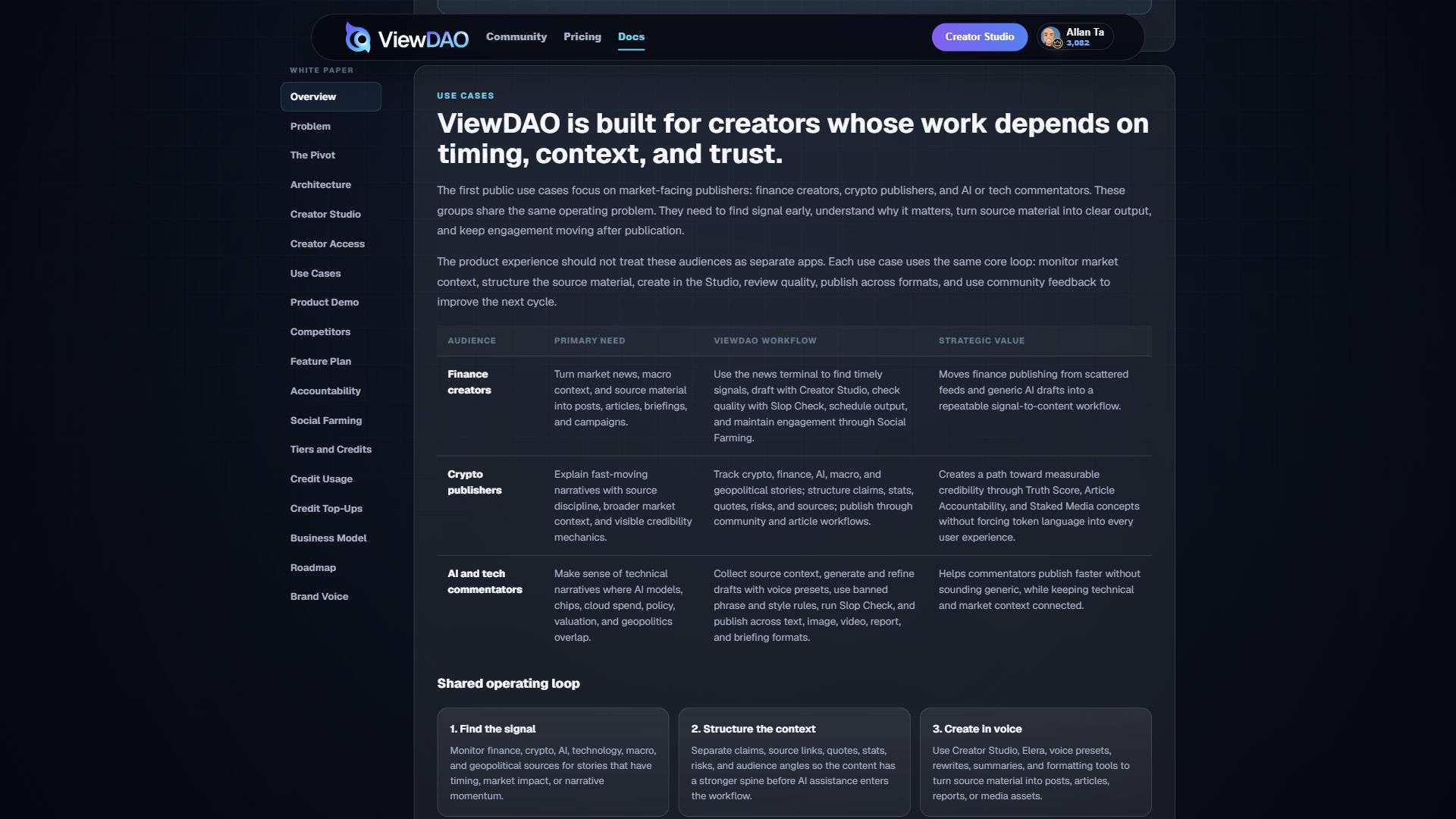
ViewDAO is built for creators whose work depends on timing, context, and trust.
The first public use cases focus on market-facing publishers: finance creators, crypto publishers, and AI or tech commentators. These groups share the same operating problem. They need to find signal early, understand why it matters, turn source material into clear output, and keep engagement moving after publication.
The product experience should not treat these audiences as separate apps. Each use case uses the same core loop: monitor market context, structure the source material, create in the Studio, review quality, publish across formats, and use community feedback to improve the next cycle.
| Audience | Primary Need | ViewDAO Workflow | Strategic Value |
|---|---|---|---|
| Finance creators | Turn market news, macro context, and source material into posts, articles, briefings, and campaigns. | Use the news terminal to find timely signals, draft with Creator Studio, check quality with Slop Check, schedule output, and maintain engagement through Social Farming. | Moves finance publishing from scattered feeds and generic AI drafts into a repeatable signal-to-content workflow. |
| Crypto publishers | Explain fast-moving narratives with source discipline, broader market context, and visible credibility mechanics. | Track crypto, finance, AI, macro, and geopolitical stories; structure claims, stats, quotes, risks, and sources; publish through community and article workflows. | Creates a path toward measurable credibility through Truth Score, Article Accountability, and Staked Media concepts without forcing token language into every user experience. |
| AI and tech commentators | Make sense of technical narratives where AI models, chips, cloud spend, policy, valuation, and geopolitics overlap. | Collect source context, generate and refine drafts with voice presets, use banned phrase and style rules, run Slop Check, and publish across text, image, video, report, and briefing formats. | Helps commentators publish faster without sounding generic, while keeping technical and market context connected. |
Shared operating loop
Use-case rule: ViewDAO should stay category-specific without becoming niche-locked. Finance, crypto, AI, and tech creators are the first wedge because their work depends on fast signals, sourced context, and credibility. The same workflow can later expand to other high-context publishing categories.
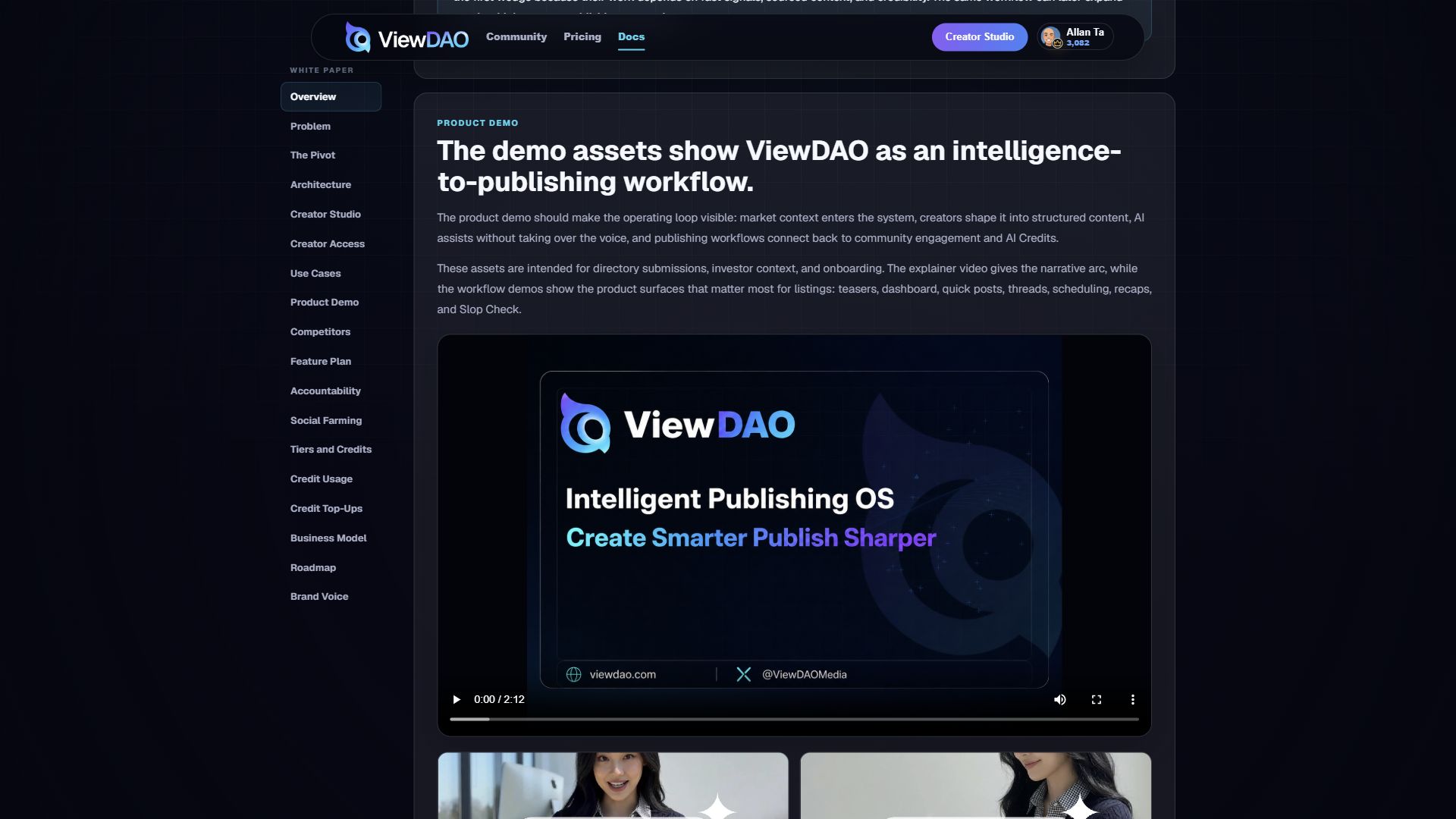
The demo assets show ViewDAO as an intelligence-to-publishing workflow.
The product demo should make the operating loop visible: market context enters the system, creators shape it into structured content, AI assists without taking over the voice, and publishing workflows connect back to community engagement and AI Credits.
These assets are intended for directory submissions, investor context, and onboarding. The explainer video gives the narrative arc, while the workflow demos show the product surfaces that matter most for listings: teasers, dashboard, quick posts, threads, scheduling, recaps, and Slop Check.
Product demo screenshots
Use these live captures when a directory, review site, or partner listing asks for static product screenshots instead of video.
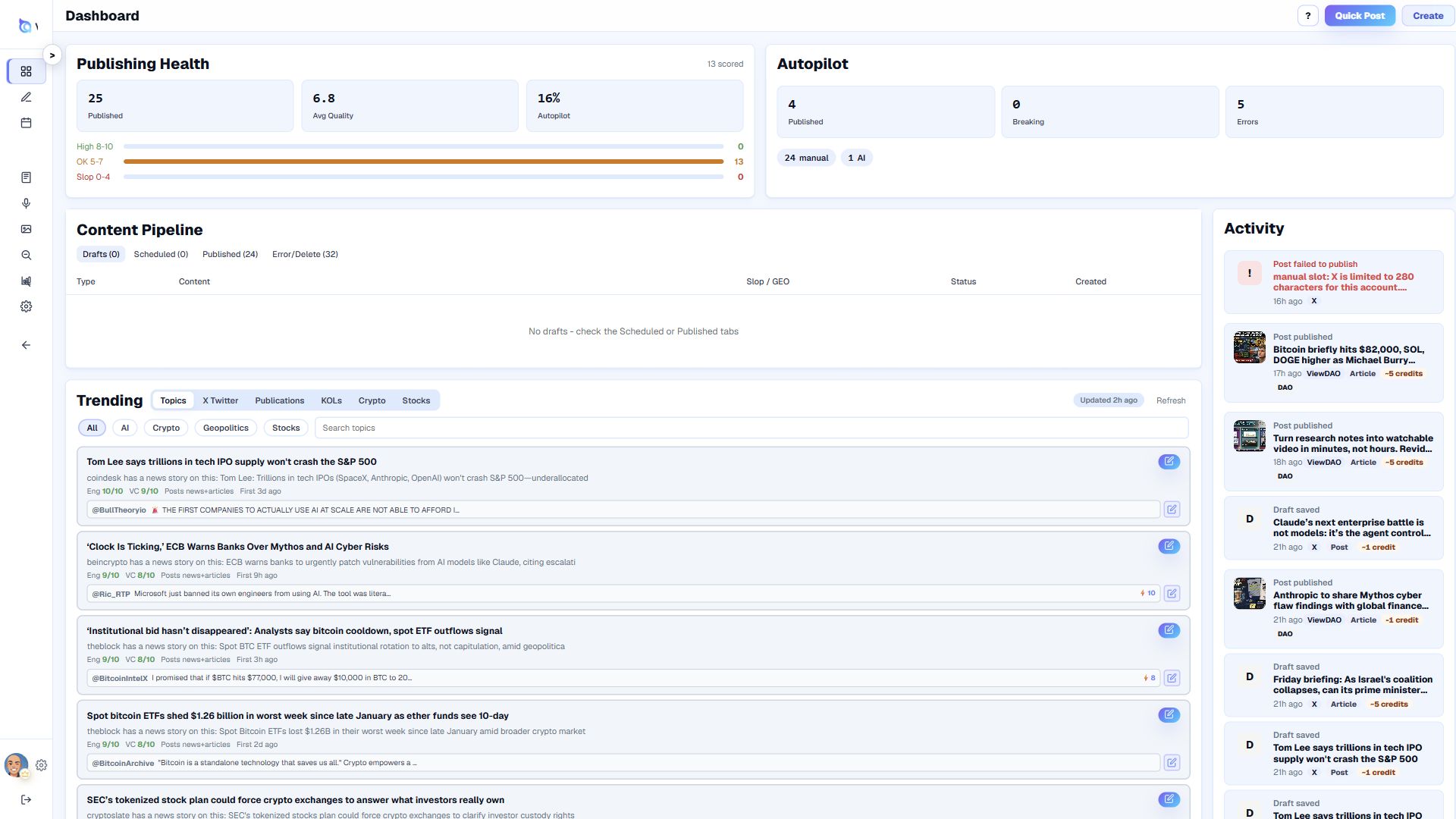
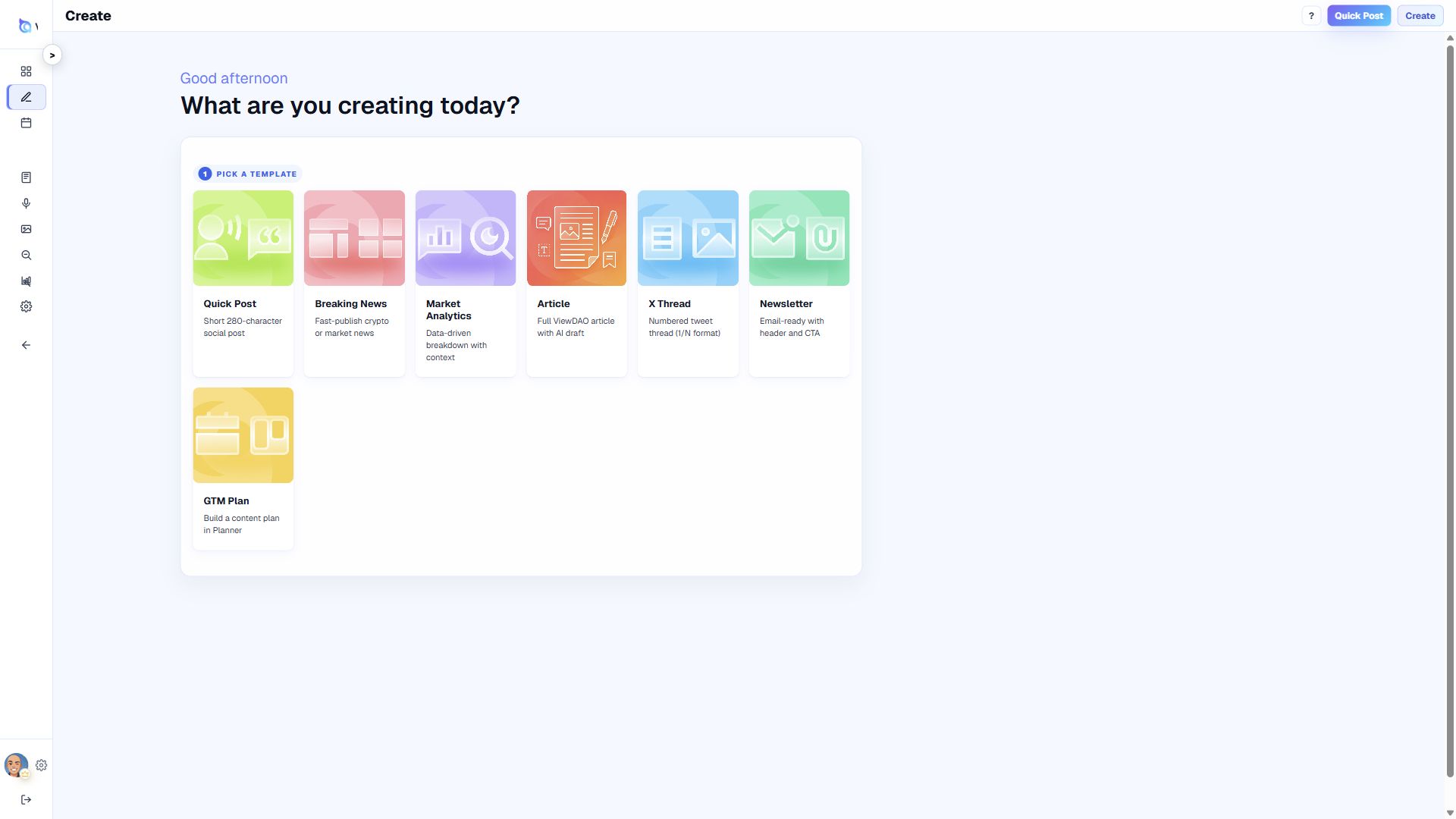
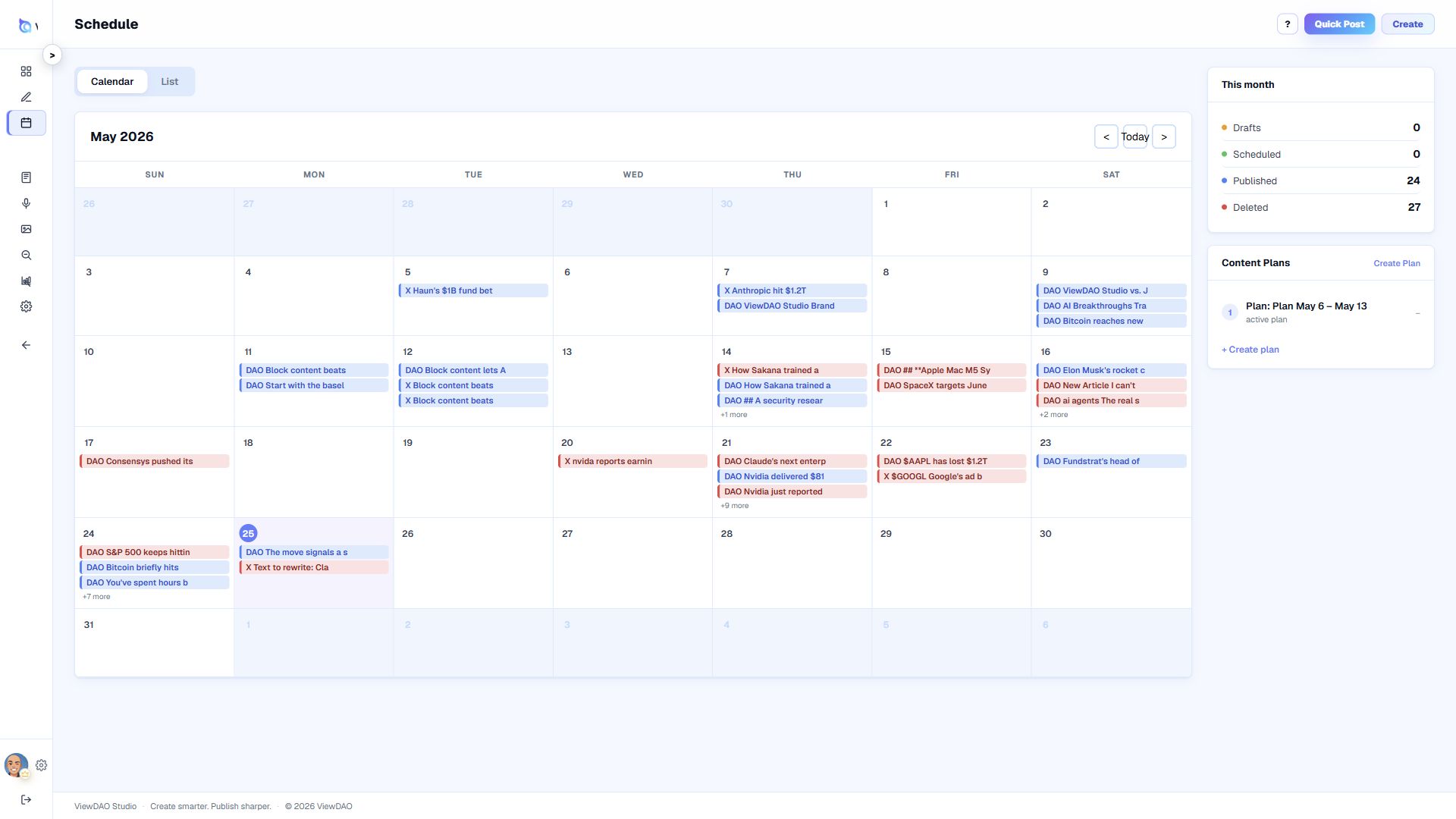
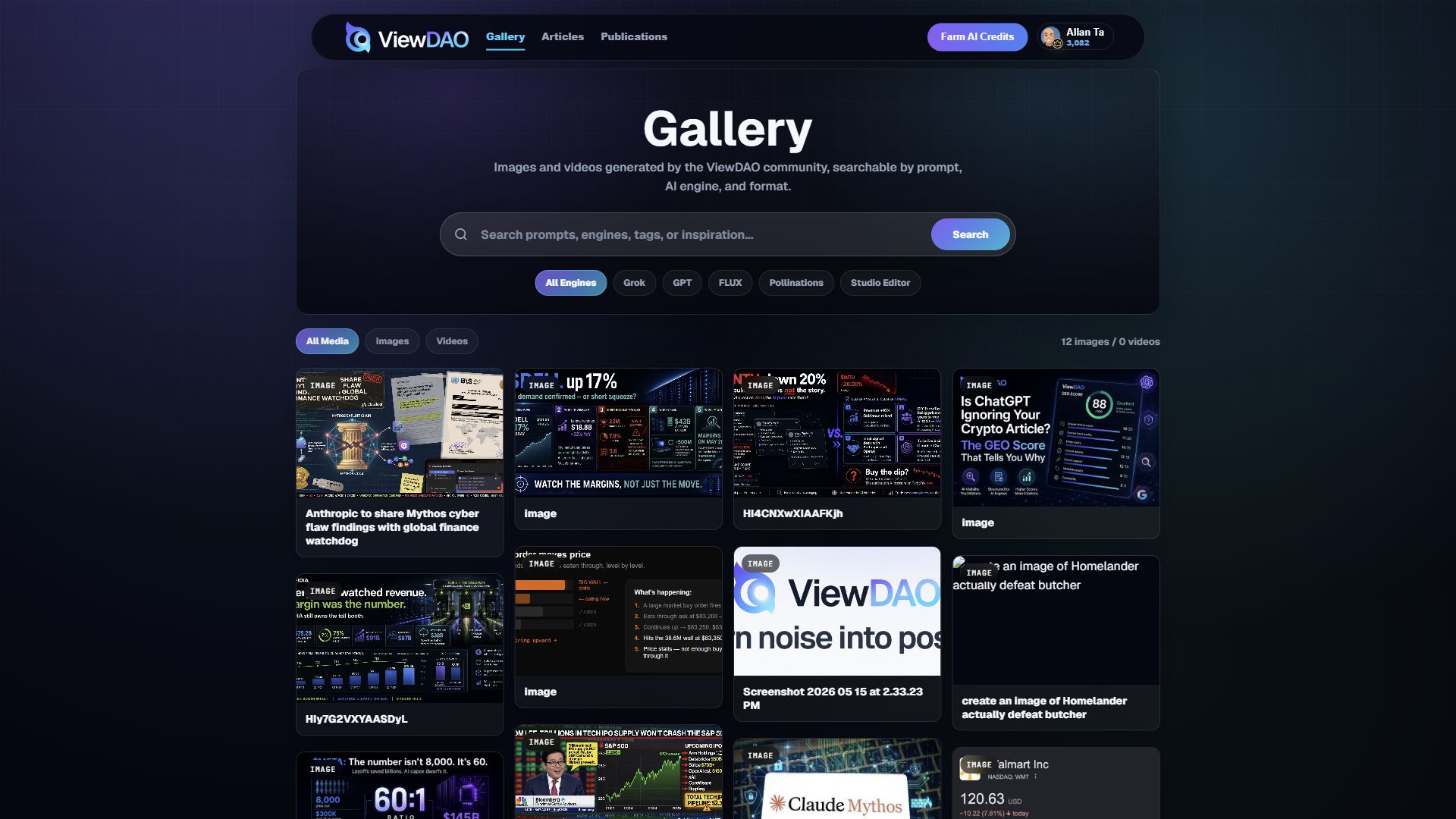
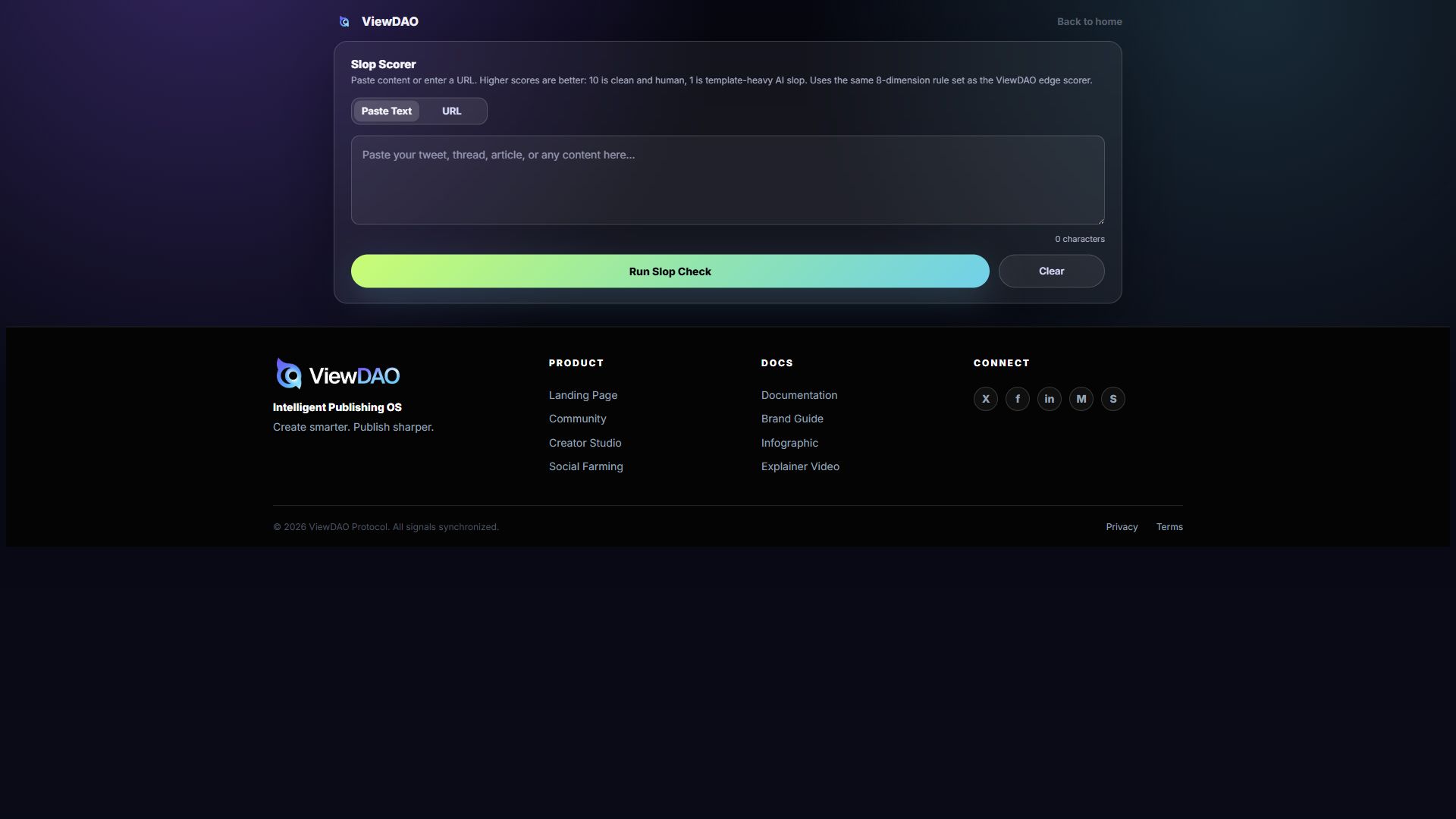
Demo rule: public listing assets should show the actual workflow, not abstract brand art. The best submissions should pair one short explainer video with clear screenshots of Studio, creation templates, market context, and quality or credibility mechanics.
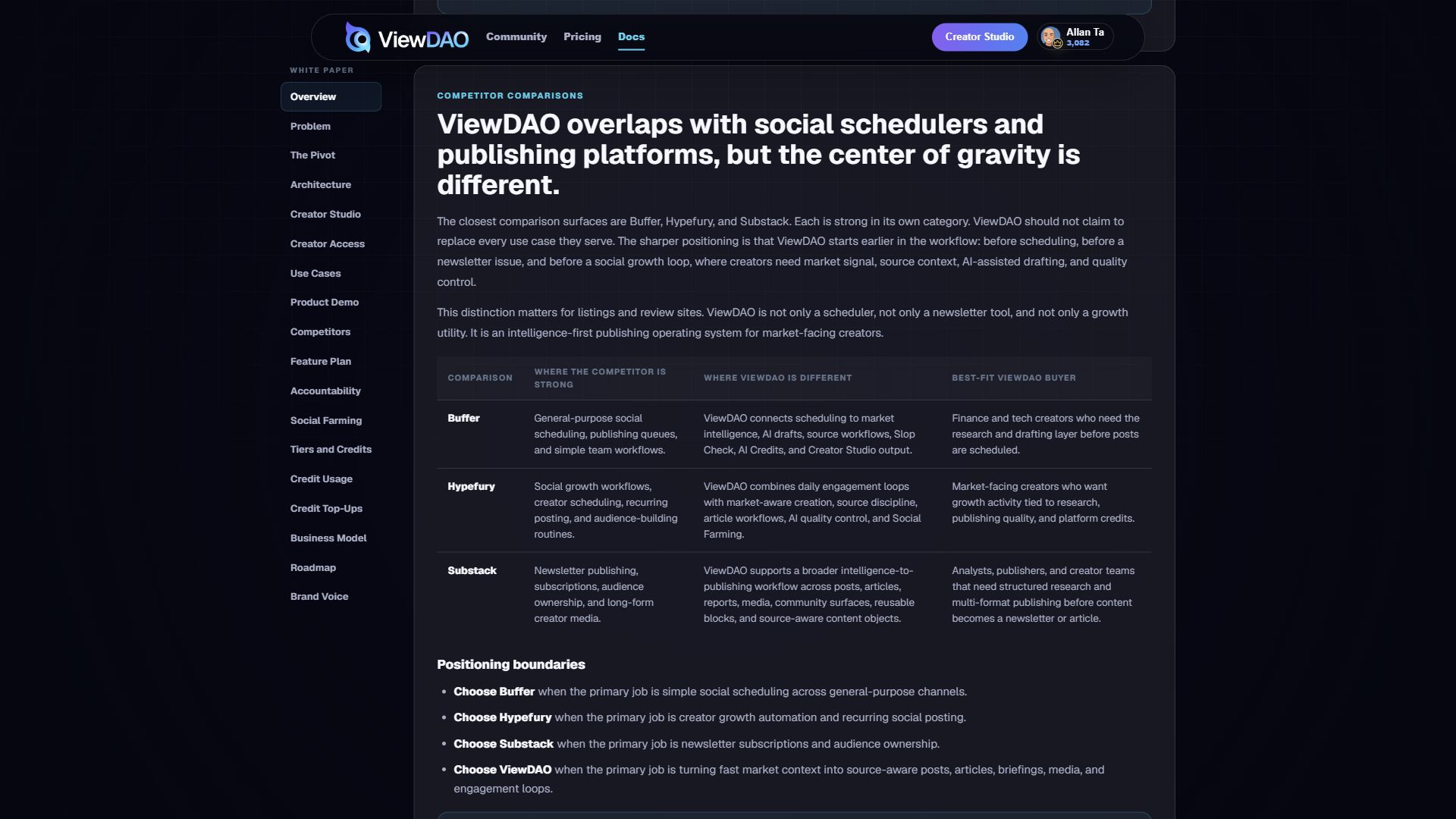
ViewDAO overlaps with social schedulers and publishing platforms, but the center of gravity is different.
The closest comparison surfaces are Buffer, Hypefury, and Substack. Each is strong in its own category. ViewDAO should not claim to replace every use case they serve. The sharper positioning is that ViewDAO starts earlier in the workflow: before scheduling, before a newsletter issue, and before a social growth loop, where creators need market signal, source context, AI-assisted drafting, and quality control.
This distinction matters for listings and review sites. ViewDAO is not only a scheduler, not only a newsletter tool, and not only a growth utility. It is an intelligence-first publishing operating system for market-facing creators.
| Comparison | Where the competitor is strong | Where ViewDAO is different | Best-fit ViewDAO buyer |
|---|---|---|---|
| Buffer | General-purpose social scheduling, publishing queues, and simple team workflows. | ViewDAO connects scheduling to market intelligence, AI drafts, source workflows, Slop Check, AI Credits, and Creator Studio output. | Finance and tech creators who need the research and drafting layer before posts are scheduled. |
| Hypefury | Social growth workflows, creator scheduling, recurring posting, and audience-building routines. | ViewDAO combines daily engagement loops with market-aware creation, source discipline, article workflows, AI quality control, and Social Farming. | Market-facing creators who want growth activity tied to research, publishing quality, and platform credits. |
| Substack | Newsletter publishing, subscriptions, audience ownership, and long-form creator media. | ViewDAO supports a broader intelligence-to-publishing workflow across posts, articles, reports, media, community surfaces, reusable blocks, and source-aware content objects. | Analysts, publishers, and creator teams that need structured research and multi-format publishing before content becomes a newsletter or article. |
Positioning boundaries
- Choose Buffer when the primary job is simple social scheduling across general-purpose channels.
- Choose Hypefury when the primary job is creator growth automation and recurring social posting.
- Choose Substack when the primary job is newsletter subscriptions and audience ownership.
- Choose ViewDAO when the primary job is turning fast market context into source-aware posts, articles, briefings, media, and engagement loops.
Comparison rule: competitor pages should stay honest. ViewDAO wins when the buyer needs intelligence, source structure, AI-assisted creation, Slop Check, and creator workflows in one loop. It should not be positioned as a generic replacement for every social scheduler or newsletter platform.
The build plan combines Creator OS workflows with community intelligence.
The latest strategy file expands the white paper from positioning into product requirements. The immediate product is a unified Creator OS plus Community Intelligence Layer, with one identity system, one market signal loop, and a shared credit economy.
| Feature Area | What Ships | Why It Matters |
|---|---|---|
| Studio | Approved-creator access gate, Brand Voice, Create by Context, market-aware AI drafting, Article-only blocks, live SEO/GEO scoring, crawler preview, pre-publish Slop Scorer, and reply drafts. | Replaces the scattered creator stack with one high-signal creation workflow. |
| Trends | Trending narratives, token launches, on-chain signals, macro, DeFi, AI tokens, regulation, social buzz, KOL search, research panels, and Market Pulse. | Turns live market context into draftable, publishable signals. |
| Schedule | Calendar, queue mode, next-up preview, status tracking, and multi-platform publishing for X, Telegram, Farcaster, and email. | Makes ViewDAO useful as a daily operating system, not only a research page. |
| Analytics | Impressions, opens, clicks, subscriber growth, narrative performance, prediction score, and audience segmentation. | Connects publishing performance back to future strategy. |
| Voice | Voice profiles, vocabulary preferences, banned phrases, style rules, and multi-voice support. | Keeps AI output consistent, recognizable, and creator-owned. |
Community intelligence layer
- News aggregation feed: AI-curated crypto, finance, AI, tech, macro, and geopolitical news from curated RSS/API sources.
- Flash News Detection: priority alerts for breaking events using multi-factor classification.
- On-chain enrichment: stories can be annotated with wallet movement, TVL shifts, token unlocks, and relevant protocol context.
- Social Oracle: content weight comes from reputation, prediction accuracy, engagement, and community signal rather than follower count alone.
- Integrated market actions: prediction-market widgets and wallet-aware context remain planned action-layer features after the core web product is stable.
Creators can attach measurable outcomes to predictions and articles.
The latest strategy makes accountability the moat: creators do not only publish opinions; they can attach clear resolution criteria to market calls and high-conviction articles, creating a portable performance record for readers.
| Mechanic | Commitment | Resolution | Outcome |
|---|---|---|---|
| Predictions | Creator publishes a clear market or narrative call with measurable criteria. | Price calls resolve through oracle data where possible; narrative edge cases require clear adjudication rules. | Correct calls improve the creator's public performance record. Failed calls remain visible for accountability. |
| Article Accountability | Creator marks a published article as a high-conviction piece. | 7-day window measured against subscriber conversion, engagement rate, and read-through rate. | Strong performance can earn AI Credits bonuses and reputation signals. Underperformance remains part of the article record. |
| Sponsored Intelligence | Partner funds a premium placement with source context and campaign goals. | Ad run monitored for placement quality, performance, and community flags. | Performance, source quality, and community response inform future placement quality. |
Design rule: AI Credits are platform capacity creators earn or consume. Accountability mechanics should improve public performance records without requiring token language in the product experience.
The platform economy connects access, contribution, and AI usage.
ViewDAO uses a four-tier progression system and a ledger-backed AI Credit wallet. Tiers define access and earning power. AI Credits define spendable platform capacity for AI-assisted writing, research, SEO/GEO enrichment, image generation, video generation, and analysis.
New signups should receive 30 AI Credits. This gives enough room to try useful workflows without removing the need to participate, publish, or farm more credits.
Tier ladder
| Tier | Role | Core Meaning | Farming Multiplier | Suggested Grant |
|---|---|---|---|---|
| User | Participant | Reads, follows, saves, comments, farms credits, and tries limited AI actions. | 1.0x | 30 welcome credits |
| Creator | Publisher | Publishes posts and articles, uses Composer, schedules content, and accesses basic analytics. | 1.25x | +50 upgrade credits |
| Agency | Scaler | Runs higher-volume publishing with stronger automation, campaign workflows, and reporting. | 1.5x | +150 upgrade credits |
| Master | Leader | Uses the full power system with highest limits, priority tools, advanced analytics, and premium automation. | 2.0x | +300 upgrade credits |
Positioning: User consumes and participates. Creator publishes. Agency scales publishing. Master leads the ecosystem.
Credit wallet
Every logged-in user should see an AI Credit counter in Studio. Clicking the counter opens a wallet with available credits, earned credits, used credits, pending credits, current tier, farming multiplier, and recent activity.
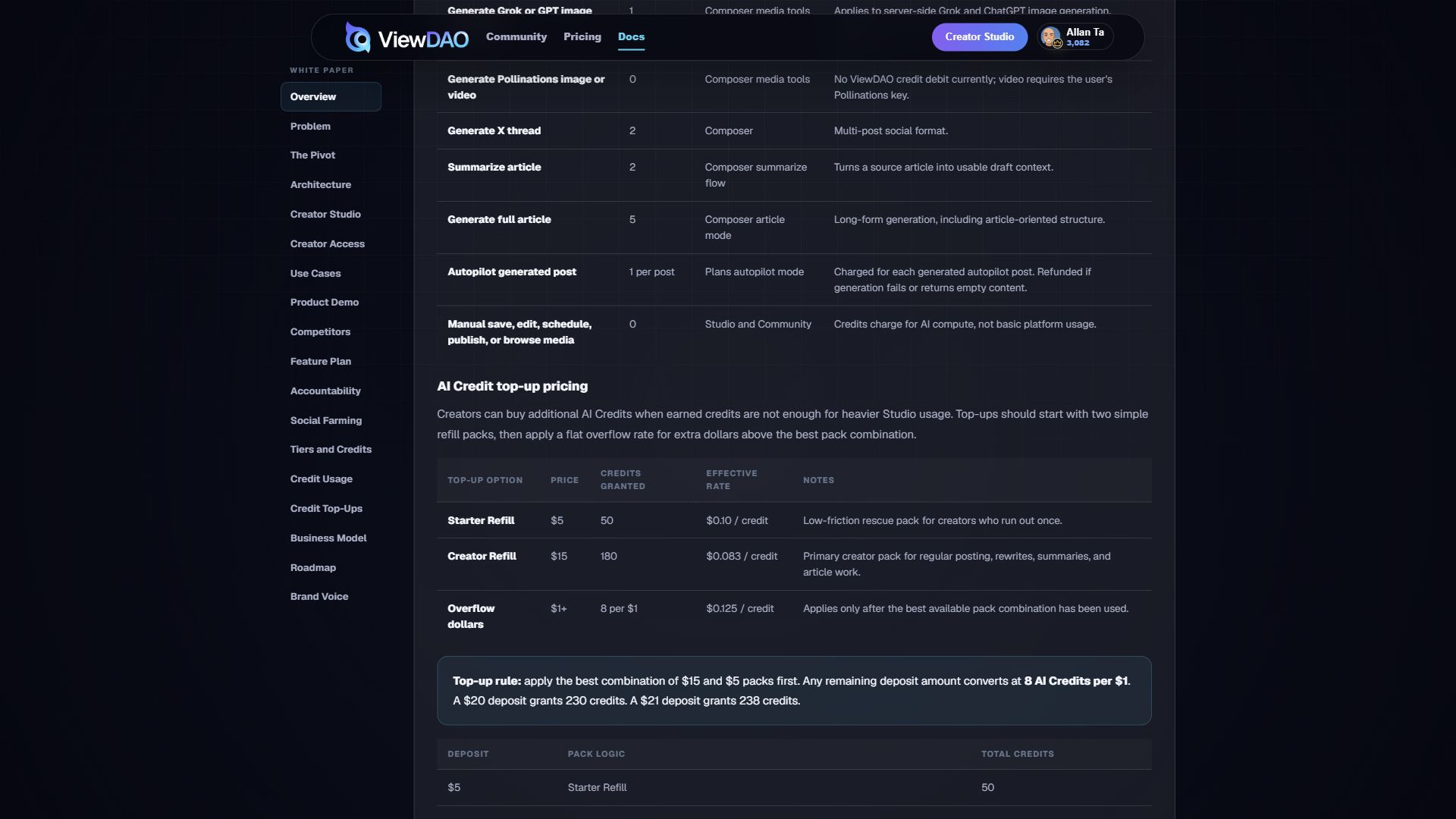
AI Credit usage and earning table
This table documents the current credit policy exposed in Studio. AI Credits are charged for AI compute, automation, scoring, and generated media. Manual editing, saving, scheduling, publishing, and library browsing remain free.
| AI action | Credits used | Where it runs | Notes |
|---|---|---|---|
| Standard one-call AI action | 1 | Studio | Default metered AI action when no heavier mode is selected. |
| Generate quick post | 1 | Composer | Lightweight draft or single social post. |
| Rewrite or improve selected text/title | 1 | Composer Writing Enhancement | Tone pass, shorter version, clearer version, grammar cleanup, platform fit, or title hooks. Refunded if no rewrite is returned. |
| Enhance full draft | 2 | Composer Writing Enhancement | Full-draft quality pass using brand voice and slop checking. Refunded if no enhanced draft is returned. |
| SEO/GEO score tool | 1 | Composer article SEO/GEO panel | Charged once per article item when opening the live SEO/GEO scoring tool. |
| Generate Grok or GPT image thumbnail | 1 | Composer media tools | Applies to server-side Grok and ChatGPT image generation. Assets can be saved to the creator library and public media gallery. |
| Generate Pollinations image or video | 0 | Composer media tools | No ViewDAO credit debit currently; video requires the user's Pollinations key. |
| Generate X thread | 2 | Composer | Multi-post social format. |
| Summarize article | 2 | Composer summarize flow | Turns a source article into usable draft context. |
| Generate full article | 5 | Composer article mode | Long-form generation, including article-oriented structure. |
| Autopilot generated post | 1 per post | Plans autopilot mode | Charged for each generated autopilot post. Refunded if generation fails or returns empty content. |
| Manual save, edit, schedule, publish, or browse media | 0 | Studio and Community | Credits charge for AI compute, not basic platform usage. |
AI Credit top-up pricing
Creators can buy additional AI Credits when earned credits are not enough for heavier Studio usage. Top-ups should start with two simple refill packs, then apply a flat overflow rate for extra dollars above the best pack combination.
| Top-up option | Price | Credits granted | Effective rate | Notes |
|---|---|---|---|---|
| Starter Refill | $5 | 50 | $0.10 / credit | Low-friction rescue pack for creators who run out once. |
| Creator Refill | $15 | 180 | $0.083 / credit | Primary creator pack for regular posting, rewrites, summaries, and article work. |
| Overflow dollars | $1+ | 8 per $1 | $0.125 / credit | Applies only after the best available pack combination has been used. |
Top-up rule: apply the best combination of $15 and $5 packs first. Any remaining deposit amount converts at 8 AI Credits per $1. A $20 deposit grants 230 credits. A $21 deposit grants 238 credits.
| Deposit | Pack logic | Total credits |
|---|---|---|
| $5 | Starter Refill | 50 |
| $10 | 2 Starter Refills | 100 |
| $15 | Creator Refill | 180 |
| $16 | Creator Refill + $1 overflow | 188 |
| $20 | Creator Refill + Starter Refill | 230 |
| $21 | Creator Refill + Starter Refill + $1 overflow | 238 |
AI Credits earned
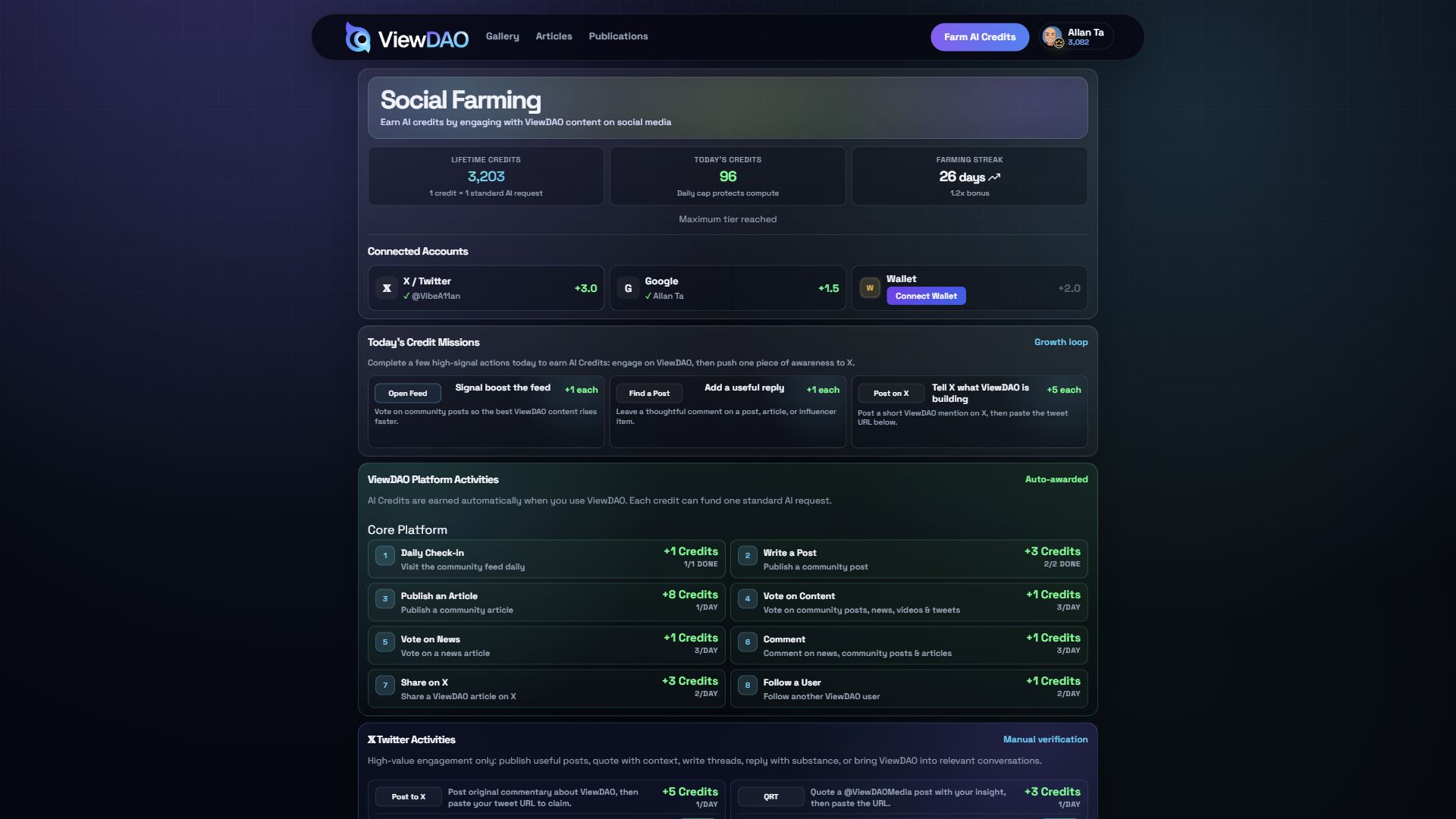
Users earn AI Credits by performing useful actions that improve discovery, quality, and network growth. Rewards should be capped, validated, and multiplied by tier.
| Earn action | Credits earned | Validation |
|---|---|---|
| Welcome grant | 30 | Granted to new users. |
| Daily check-in | 1 | One per day. |
| Publish quick post on ViewDAO | 1 | Cap of 2 per day. |
| Publish article on ViewDAO | 8 | Cap of 1 per day. Higher reward offsets heavier article generation and enhancement workflows. |
| Vote on post or article | 1 | Cap of 3 post votes and 3 article votes per day. |
| Meaningful comment | 1 | Cap of 3 per day with anti-spam checks. |
| Share ViewDAO post or article | 3 | Cap of 2 per day with share validation. |
| Follow a creator | 1 | Cap of 2 per day. |
| Connect X account | 3 | One-time social connection bonus. |
| Connect Google account | 1.5 | One-time social connection bonus. |
| Connect wallet | 2 | One-time wallet connection bonus. |
| X share | 5 | Cap of 1 per day. |
| X quote repost | 3 | Cap of 1 per day. |
| X thread | 5 | Cap of 1 per day. |
| X smart comment | 2 | Cap of 2 per day. |
| X tag task | 2 | Cap of 1 per day. |
Verified user rule
A verified user is a real account that has completed enough identity and activity checks to count for referrals, farming rewards, and reputation signals.
- Email is verified.
- Profile is created.
- At least one social account or wallet is connected.
- Account is older than 24 hours.
- The user has completed a real action, such as saving content, following a creator, claiming a farming task, or earning/spending at least 5 credits.
Implementation model
The wallet should use a balance table for fast UI reads and a ledger as the source of truth. The ledger prevents counter drift, supports refunds, and gives admins an audit trail.
| Table | Purpose | Important Fields |
|---|---|---|
| user_credit_balances | Fast current wallet state for UI. | available_credits, earned_lifetime, used_lifetime, granted_lifetime, pending_credits |
| user_credit_ledger | Source of truth for all credit movements. | amount, type, reason, reference_type, reference_id, metadata |
| user_tiers | Tracks access tier and multiplier. | tier, tier_source, started_at, expires_at, metadata |
MVP rule: launch with 30 welcome credits, a visible Studio credit counter, ledger-backed balances, AI action spending, farming rewards, tier multipliers, insufficient-credit gating, and admin adjustment support.
ViewDAO combines creator software, intelligence tooling, and programmable publishing infrastructure.
- Studio subscriptions: recurring plans for creators, teams, and media operators.
- AI usage credits: metered credits for writing, image, video, summarization, enrichment, and research workflows.
- Intelligence feeds: premium market, AI, macro, technology, and geopolitical signals.
- API access: structured content, trend, market context, and analytics endpoints for partners.
- Sponsored intelligence pages: premium placements with source context, analytics, and format-aware campaign reporting.
- Enterprise publishing tools: custom workflows for research teams, media brands, investor communities, and fintech operators.
- Sponsored intelligence: premium placements with source context, analytics, quality controls, and campaign reporting.
- Performance products: paid analytics, prediction records, and creator reputation tools for teams that need measurable publishing outcomes.
The roadmap moves from live studio workflows toward accountability, credits, and public intelligence infrastructure.
| Phase | Focus |
|---|---|
| Phase 1 - Foundation | Production Creator OS: approved creator applications, Studio access gating, Brand Voice, Create by Context, Slop Scorer, Schedule, Queue Mode, Trends, KOL Search, Market Pulse, news feed, public Social Farming, Article-only SEO/GEO blocks and previews, and first creator cohort. |
| Phase 2 - Accountability Economy | Prediction records v1, public Prediction Leaderboard, Social Oracle, Article Accountability v1, and AI Credits system. |
| Phase 3 - Scale | Sponsored intelligence network, premium creator content, mobile app, AI Credits policy review, prediction-market widgets, and full monetization streams. |
| Platform Expansion | Structured content block system, rendering templates, richer analytics, source-to-claim mapping, server-side URL metadata enrichment, duplicate-draft audit tooling, reusable intelligence modules, public API, webhooks, SDKs, and partner distribution infrastructure. |
Sharp, intelligent, confident, and built for creators.
ViewDAO should feel like an intelligence cockpit for people who publish under pressure. The interface should be fast, structured, calm, and high-signal. It should help users move from messy inputs to clear outputs without making them feel like they are fighting a tool.
| Voice Rule | Meaning |
|---|---|
| Sharp, not clever | Use precise language. Avoid jokes that weaken clarity. |
| Intelligent, not academic | Explain complexity clearly without sounding detached or inflated. |
| Confident, not arrogant | Make strong claims when supported by the product or evidence. |
| Energized, not hyped | Keep momentum without resorting to empty excitement. |
| Creator-side, not platform-side | Center the user's work, workflow, and publishing pressure. |
| Flywheel-forward | Show how signals, creation, quality, publishing, and learning reinforce each other. |
Core brand line: Create smarter. Publish sharper. AI writing, image and video creation with market intelligence built in. One studio. Every format.
Useful engagement earns spendable AI Credits.
Social Farming is ViewDAO's participation loop for rewarding people who improve the platform and help more users discover it. The system replaces abstract farming points with AI Credits: usable platform capacity that can be spent on AI-assisted creation, research, summarization, rewriting, scoring, and analysis.
One AI Credit represents one standard LLM call, such as asking Elera a question, summarizing an article, analyzing a source, improving a post, or generating a lightweight draft. Heavier workflows such as full article generation, multi-source research, deep analysis, or image generation can cost multiple credits.
The Social Farming page is public. Visitors can view the credit model and task loops without signing in. User-specific balances, streaks, connected accounts, and claim state only appear for authenticated users, and claim actions route anonymous visitors into sign-in.
How credits are earned
Credit accounting
Credit rule: AI Credits are spendable platform capacity, not reputation and not a generic score. They should be tracked in a ledger, capped daily, protected by anti-spam checks, and separated from trust or tier status. High-reputation users can earn higher limits or multipliers, but spending credits should not reduce reputation.